





Jin Saotome
Members
-
Joined
-
Last visited
-
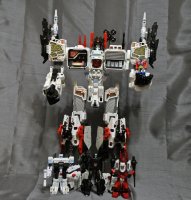
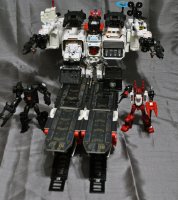
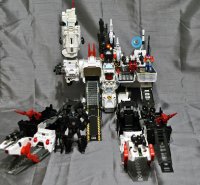
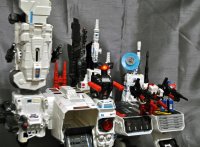
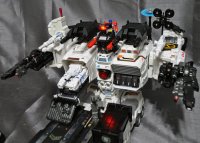
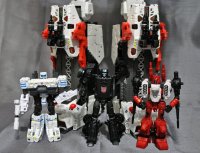
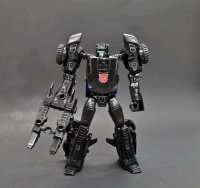
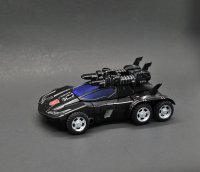
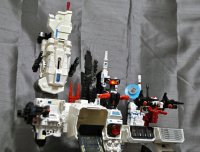
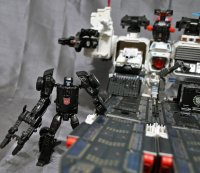
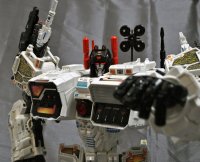
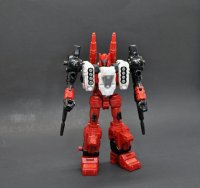
This is the largest custom I've done so far, introducing a Generations 'G1' style Metroplex that comes with a new DELUXE SCALE Scamper, Sixgun, and Slammer! This is a huge figure and comes with multiple new attachments such as shoulder antenna, G1 red double barrel gun, twin knee turrets, 3rd party heel turrets, twin arm turrets, antenna, satellite dish, spire, 3 extra ramps, (one folding chest c-tainer ramp, two leg ramps) and of course his three bots. Metroplex transforms into a city mode and battle-carrier mode. City mode features a clip-on chest ramp that folds down and extends further and a clip on tower building-top to hide his hand. You can put the shoulder antenna, double guns, and other cannons just about anwyhere and there are two new 5mm ports located on his back for added placement. The small Optimus Prime is actually a magnetic 'key' that activates the eye and target lights! These magnetron LED units function separatly from the electronic light and sound which still work when you press his chest. Touch Prime to the top of Metro's head and the eyes turn on, touch again and they turn off! Metroplex features a TON of paint work and Toyhax's label set. There's all sorts of blue windows, metallic sections, hubcaps, tiny yellow shoulder windows, decals (like the MasterMade 3rd party vers) and I think it's a good cross between the Takara and Hasbro Metro in my opinion. He has the 3rd party heel turrets which help him stand and unfold into standing or placement turrets. They don't really attach to anything but look cool sitting on top in battle carrier mode. Now for the bots! I created a deluxe scale Scamper that's also a headmaster! He has a removable roof gun and was created to look like the G1 version. Sixgun is basicsally the same as the retail version but has G1 colors, same with Slammer. Slammer's tower mode can be placed on the deck or my favorite way of display, fold Metro's left arm behind his back and plug Slammer's turret base into Metro's arm port. Sixgun can be disassembled for turret mode. I used Testors Aztek Airbrush, Metalizer, Tamiya lacquers (Tamiya spray Racing White is the color match for Metro's white) and Army painter washes followed by a sealer of Mr Hobby.
-
Some kinds of plastics are extremely resistant to paint no matter what you do. These are usually toughened waxy plastics/superhard plastics like polyoxymethylene that make up parts of a figure that could easily be stressed if made from the usual pvc or abs. The limbs of the Transformers Siege Battle Masters are made of this stuff and you need to color them, so what do you do? It's RIT DyeMore for synthetics to the rescue! Mix half the bottle of dye with a cup or so of water, boil the liquid on med to high heat just so you get a gentle rolling boil and drop your parts in. I like to suspend mine in a strainer so I can 'lift and look' to check the color. In under a minute the pieces will start to be dyed with a color that won't rub off! The longer you soak them the deeper the color. Here I've dyed the lower half of Slitherfang and used testors/tamiya lacquers to paint his upper half! You can even use him with your GI Joe Classified figures as a shield or drone. For more pics slither on over to his page here: Custom dyed Slitherfang
-
This is extremely well done! Cardboard eh?
-
This week I've created Skywarp in Bumblebee-movie-syle similar to the Starscream I made earlier. The body is a Nitro Zeus/KSI Boss mold and a Shapeways shop Ariel's Customs Seeker faceplate on a Titans Return headmaster. I shortened the kneeplates, added toes, and swapped out the neck gatling guns/wrist cannon for different blaster tips to differentiate him from Starscream. Skywarp was primered with Bulldog (or Duplicolor) Automotive Adhesion Promoter, painted with Testors Metalizer and Aztek Airbrush paints, and sealed with Mr Hobby Premium flat/gloss spray sealer for a factory finished look. He transforms the same and the headmaster can fly in the cockpit! Warp on over to his page here for more pictures: Skywarp, Bumblebee movie concept
-
Many years ago I created a Cop-Out custom and after finding another Dirt Boss decided to give it another go! This time I preserved the exhaust-flip feature and used a Combiner Wars Rook head. Cop Out was primered with Bulldog Adhesion Promoter, painted with gloss lacquer, and Testors Metalizer metallics. He comes with a blaster, baton, and yes his lights flash like my original one! You can pop off his chest and switch the lights to on for a nifty red/blue flashing effect just like a real police car. For more flashy pics hit up his page here: Custom Transformers Cop-Out
-
Ready for something really unique? Here's a Transformers/Marvel Legends Crossover Bludgeon! He was created using the Silver Samurai body and heavily modded helmet, Ghost Rider head, War Machine armor/forearms, TF Hoist shoulder for the backpack, Overwatch Reaper legs, KO TF Scrapper top for the shield, and some fodder parts. Bludgeon was primered with Bulldog Adhesion Promoter, sculpted sections using Aves Fixit Sculpt, hand painted, airbrushed metallic armor effects, and sealed with Mr Hobby premium Matte. His eyes are glass reflective and he has a 5mm port in his left arm. For more pics head to his page here: Pretender Bludgeon, Marvel Legends/Transformers crossover
-
He's finished, a Siege style Vehicon based off the Decepticon Brute/Drone from War for Cybertron game. Vehicon was made from an upscaled Sideswipe KO, modded Dinobot ConstructBots Strafe head, and some movie Hound weapons. He was primered with Bulldog Adhesion promoter and painted using Tamiya/Testors lacquers and neon paint detailing that shows up great under a black light. Vehicon's paint job is metallic black with Mr Hobby premium gloss sealer. For more pics head to his page here: Custom Vehicon, voyager scale
-
Jin Saotome changed their profile photo
-
It's a gun! It's a plane! It's a tank! It's MEGATRON! Ok this time he's a tank and here I'm bringing him to you in oversized voyager scale as you remember him in the G2 toyline. Megatron was created using a 7.5" Wei Jiang scaled up voyager Hardhead. The metal chest panel was removed and sculpted over as was the M on his waist and a voyager Megatron face grafted onto the headmaster. A classic G2 paint scheme was achieved by airbrushing on a base of green followed by purple camo, then weathered, detailed, and finally sealed. Now you can have a voyager scale G2 Megatron to battle your Voyager PotP Laser Prime! For more pics head to Megatron's lair, I mean page here; Custom G2 Megatron voyager class


